I Built an Expense Tracker That Never Leaves My House
Every expense tracker I tried wanted the same thing: connect your bank account.
Mint. YNAB. Copilot. They all promise convenience in exchange for read access to your financial life. Every transaction. Every merchant. Every pattern of spending that reveals where you go, what you buy, who you’re with.
I didn’t want convenience. I wanted to know where my money goes without telling a company in San Francisco the same thing.
So I built my own. It runs on a ThinkPad T440P in my living room. It costs nothing. And it works.
The Setup
iPhone (Apple Wallet automation)
    ↓ HTTP POST via Tailscale VPN
ThinkPad T440P (24/7 server)
    ↓ Flask API
SQLite Database
    ↓
Web Dashboard
That’s it. No cloud. No subscription. No bank connection.
When I pay with Apple Wallet, an iOS Shortcut fires. It asks me two things: what was it, and how much. Then it POSTs that to my ThinkPad over Tailscale — a private mesh VPN that connects my devices without exposing anything to the public internet.
The ThinkPad runs a 50-line Flask server. It validates the data and writes it to a SQLite database. A single file. No database server needed.
The dashboard shows me what I’ve spent this month, broken down by card vs cash. That’s all I wanted to know.
What It Actually Looks Like
The dashboard runs on http://thinkpad:5000. Teenage Engineering aesthetic — monospace type, geometric blocks of color for the numbers.
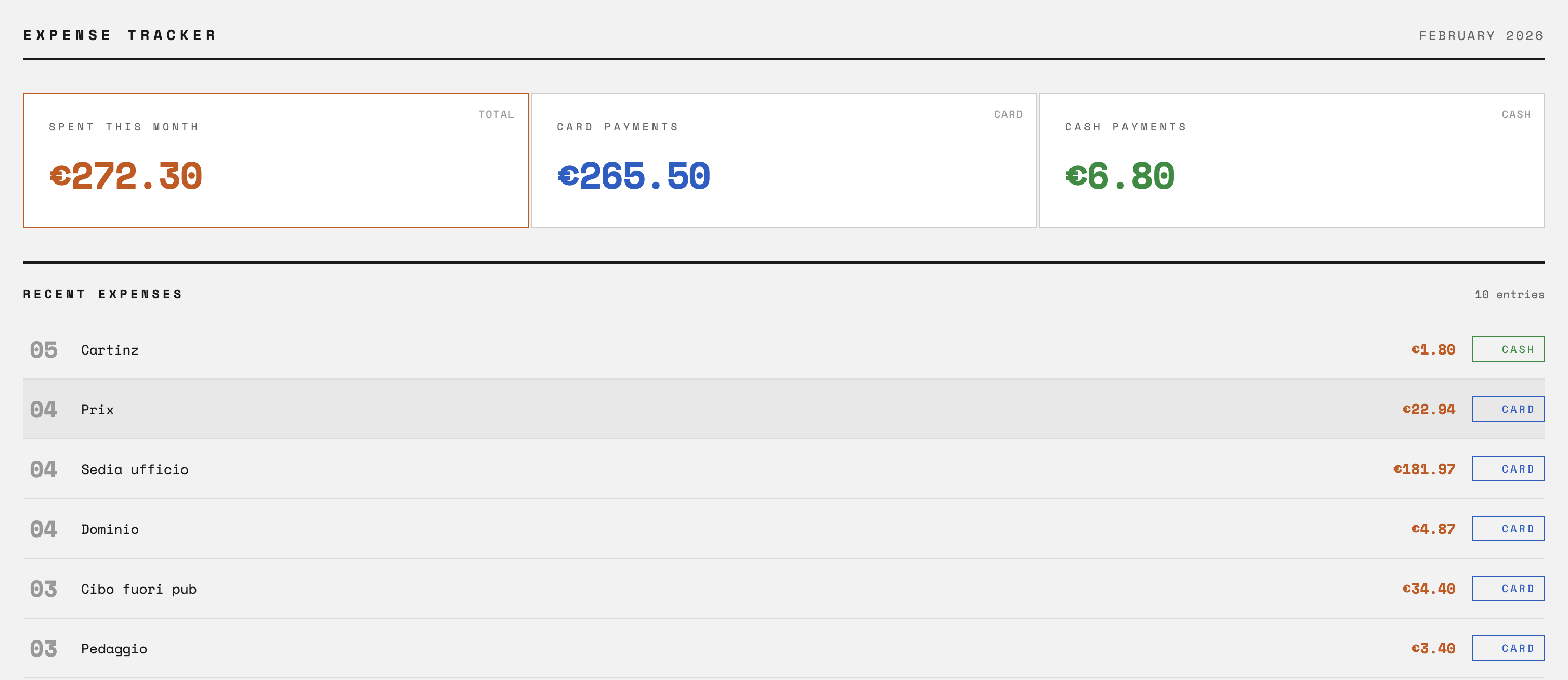
No charts. No categories. No AI insights. Just the numbers.
The Database
CREATE TABLE expenses (
    id INTEGER PRIMARY KEY,
    title TEXT NOT NULL,
    date TEXT NOT NULL,
    amount REAL NOT NULL,
    account TEXT NOT NULL,
    created_at TIMESTAMP DEFAULT CURRENT_TIMESTAMP
);
Five columns. One table. The entire thing fits in a file smaller than a photo.
I can query it with DBeaver when I want to dig deeper. Or just sqlite3 ~/expenses.db from the terminal. The data is mine. I can export it, graph it, delete it — whatever I want.
The Trade-offs
Let’s be honest about what I gave up.
No automatic categorization. I don’t know that I spent €247 on “Food & Drink” this month. I know I spent €32.40 at the grocery store. If I want categories, I have to add them myself.
No bank sync. Recurring subscriptions don’t appear automatically. If I forget to log something, it’s gone. The Apple Notes backup helps — the Shortcut saves there too — but it’s not foolproof.
No mobile app. The dashboard is a web page. It works on my phone, but it’s not native. No widgets. No notifications.
Setup isn’t trivial. You need a server running 24/7, a VPN configured, and an iOS Shortcut built. If you’re not technical, this isn’t for you.
What I Gained
My data stays home. My spending patterns don’t train someone else’s model. They don’t get sold to data brokers. They don’t get breached when Mint gets hacked.
It actually works. I’ve tried five expense trackers in the past three years. I stopped using all of them within a month. This one stuck because there’s no friction. Pay, tap, done.
I understand it completely. When something breaks, I can fix it. When I want a feature, I can add it. There’s no support ticket. No “we’ll consider that for a future release.” Just code I wrote.
It cost nothing. The ThinkPad was already running. SQLite is free. Flask is free. Tailscale’s free tier is enough. My expense tracker has no monthly fee.
The Stack
For the technical folks:
- Backend: Python 3.12, Flask
- Database: SQLite (~/expenses.db)
- Network: Tailscale for private access
- Frontend: Plain HTML/CSS, no JavaScript frameworks
- Trigger: iOS Shortcuts with Apple Wallet automation
- Server: ThinkPad T440P running Linux Mint, always on
The Flask app is two endpoints: POST /add for the Shortcut, GET / for the dashboard. That’s it.
Want to build your own? The code is open source: github.com/rogi2709/spendlocal
iOS user? Grab the Shortcut template — just add your server IP.
What’s Next
The system works. But there’s more I want:
- Systemd service so Flask starts on boot automatically
- Income tracking so I can see net position, not just spending
- Monthly summary that emails me a breakdown on the 1st
Maybe I’ll add them. Maybe I won’t. The point is: I can decide. Nobody’s going to remove a feature I depend on. Nobody’s going to raise the price. It just works, quietly, on a laptop in my living room.
The Point
You don’t need to connect your bank to track your spending. You don’t need AI categorization. You don’t need a $12/month subscription.
You need to know where your money goes. A database and a form can do that.
Every finance app is designed to extract maximum data from you in exchange for convenience. This one extracts nothing. It just counts.
Build your own tools. Keep your own data. It’s simpler than they want you to believe.
The ThinkPad draws about 15 watts. At Italian electricity prices, running my expense tracker 24/7 costs roughly €3/month. Still cheaper than YNAB.